

How matching works for 51 and 53
A PO number that starts with 51 is a standard non-trade purchase order. One that starts with 53 is used for asset purchases. Neoflo reads the first two digits and runs the same three-way match on both: the invoice, the purchase order (PO) and the goods receipt (GR) have to agree. For 52 and 54, see Match a 52 or 54 series invoice. It makes two comparisons, one on each tab.Rules for 51 and 53 invoices
Example: an invoice below its GR
Match the invoice
Before you begin
- The invoice’s Status is Matching. To open it, select Review on its row on the Invoice Dashboard.
- The PO number starts with 51 or 53.
- The GR is posted in SAP.
1
On the Matching screen, select the Invoice Details tab.
Each row shows a field, the value on the invoice, and the value on the PO / GRN Document.
2
Work through every flagged row.
- A required field was read wrong. Select the back arrow at the top left until you reach Invoice Extraction, correct the field, and confirm again. Matching runs again from the start.
- The company or vendor name is the same business, written differently. Select the check mark beside the invoice value to acknowledge it. After three acknowledgments for that vendor, Neoflo accepts the spelling on its own.
- An optional field is wrong. Edit it on this tab.
3
Check for the green banner "All mandatory fields are complete. You're good to go!"
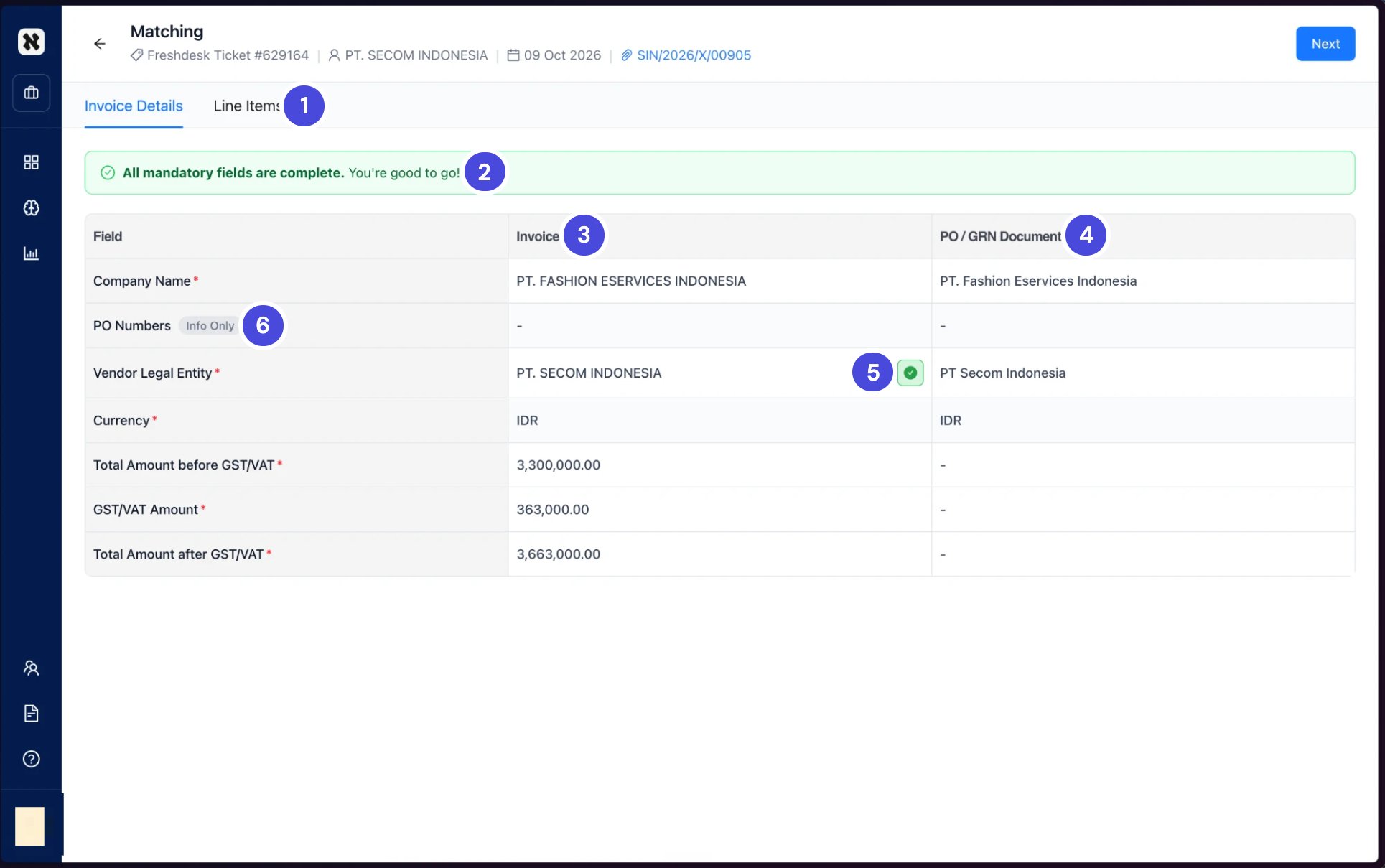
Matching, on the Invoice Details tab. PT. SECOM INDONESIA and PT Secom Indonesia are the same business, so the vendor row was acknowledged.
1Invoice Details and Line Items
2Status banner
3Invoice values
4PO / GRN Document values
5Acknowledged check mark
6Info Only: shown, not checked
4
Select the Line Items tab.
The invoice shows under INVOICE on the left, as one line: Total of invoice. The GR lines are under GRN on the right.
5
Select the check box for each GR line this invoice bills. A selected line turns green.
An invoice often bills several GR lines. Their quantities and amounts add up on the GRN side of the bar.
6
Read the bar at the bottom of the tab. It shows the invoice total, the GR total, the Tolerance and the VARIANCE.
Balanced means the totals agree within the tolerance. The tolerance is in your entity’s currency: for a Malaysian 51 series invoice, for example, the bar shows Tolerance: ±RM4.6.
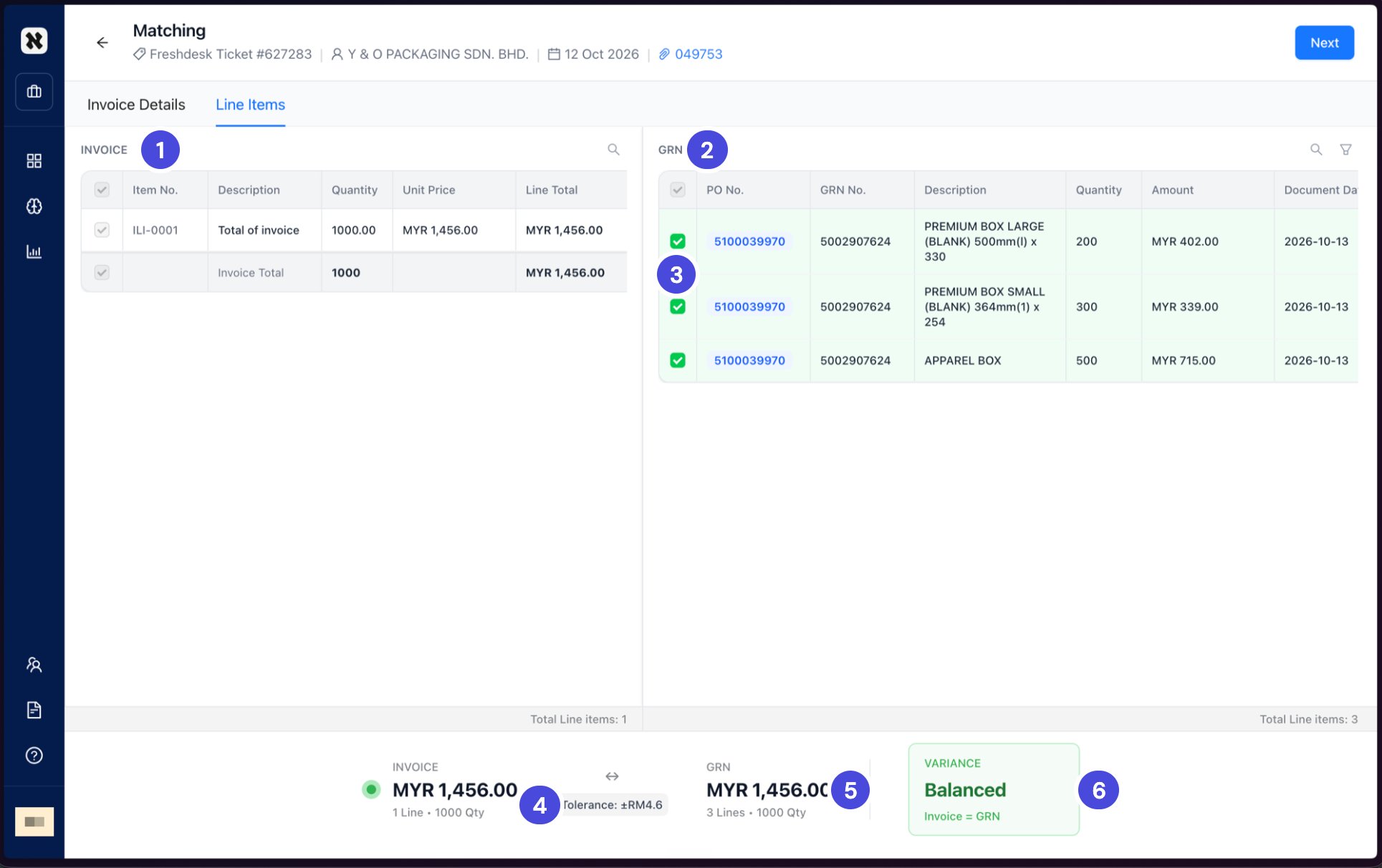
Line Items for a 51 series invoice. The three selected GR lines add up to the invoice: 200, 300 and 500 boxes make 1,000, and MYR 402, 339 and 715 make MYR 1,456.
1INVOICE: the invoice as one line, Total of invoice
2GRN: the PO’s goods receipt lines
3Selected: the GR lines this invoice bills
4Tolerance
5GRN: the selected lines, added up
6VARIANCE
7
Select Next.
What happens nextThe invoice moves to ERP Posting. Continue with Post an invoice to SAP.