

How a correction is learned
For example, invoices from one vendor read Harbor Supplies Pte Ltd, and its PO reads Harbor Supplies Private Limited. Each time you acknowledge that match, the streak grows by one.Read the Memory page
Select the brain icon in the left rail to open Memory. It has two sections: Field Corrections, and Faktur Pajak for acknowledgments on Indonesian invoices.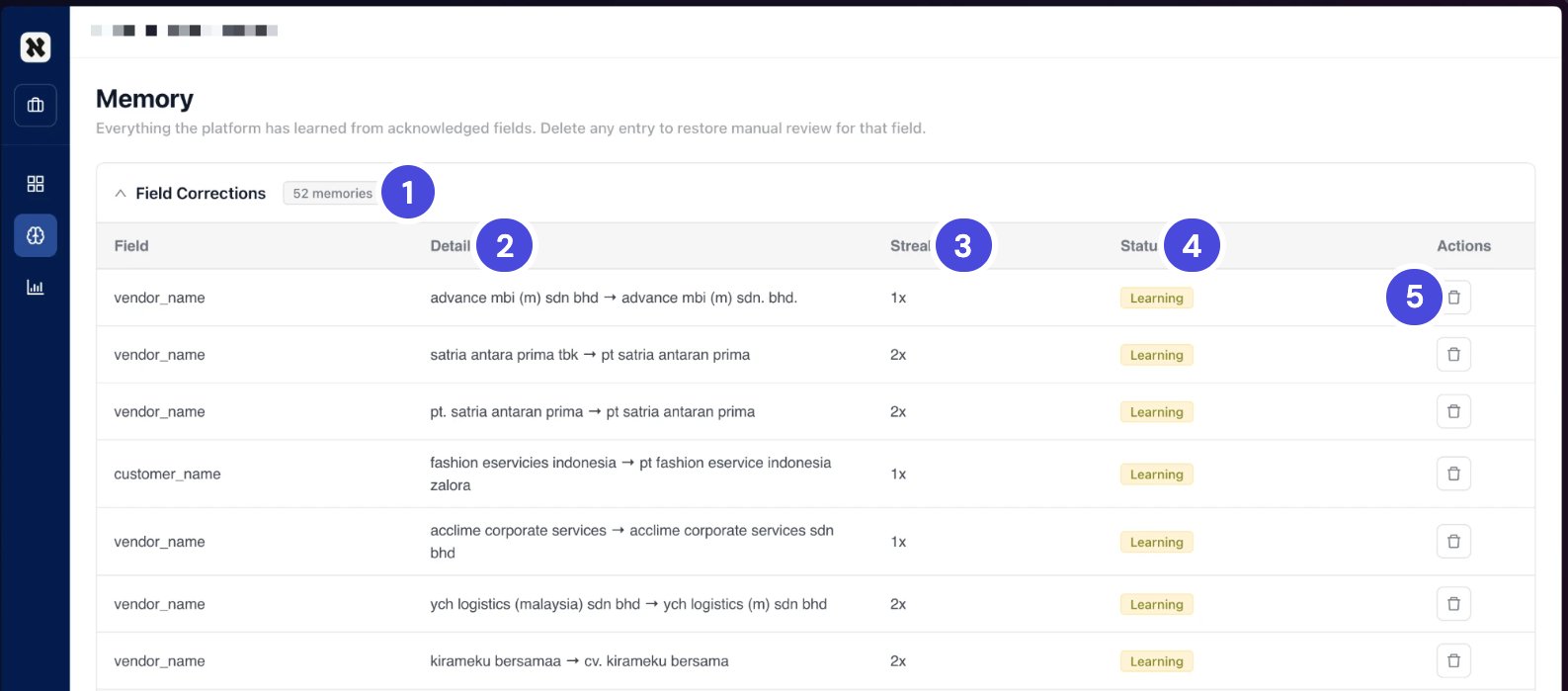
The Memory page, with 52 memories. Most are still Learning.
1Field Corrections, with the number of memories
2Details
3Streak
4Status
5Delete
Delete a memory
1
On Memory, find the row.
2
Select the trash icon in its Actions column.
Check your understanding
1. How many acknowledgments does it take before Neoflo applies a correction on its own?
1. How many acknowledgments does it take before Neoflo applies a correction on its own?
Three. The status changes from Learning to Auto-applying.
2. You notice Neoflo is matching two different vendors. What do you do?
2. You notice Neoflo is matching two different vendors. What do you do?
Delete that memory on the Memory page. The field goes back to manual review.